← All Blogs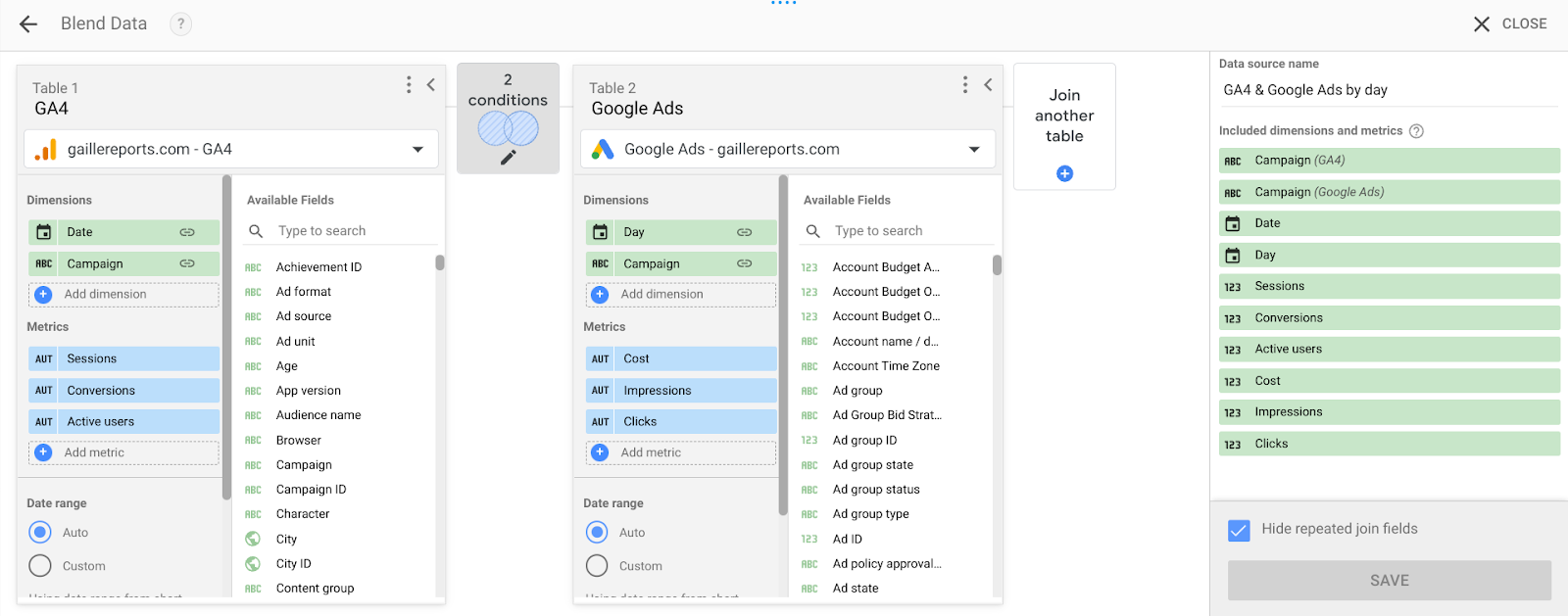
Blogs
How to Blend Google Analytics 4 and Google Ads Data in Looker Studio
8/17/2025
Quick Answer
Blend GA4 and Google Ads in Looker Studio by adding both as data sources, creating a blend joined on Campaign/Date/Landing Page, then building calculated fields like ROAS and Cost per Conversion.
Blending Google Analytics 4 (GA4) and Google Ads data in Looker Studio allows you to connect campaign costs and ad performance with on-site behavior and conversions. This gives you a complete view of ROI across campaigns.
Why Blend GA4 and Google Ads Data?
Both GA4 and Google Ads provide valuable insights, but separately they don't tell the full story. Google Ads gives you cost, clicks, impressions, CPC, and campaigns. GA4 gives you sessions, bounce rate, conversions, revenue, and engagement. By blending them, you can answer: which campaigns drive the most conversions at the lowest cost, what's your ROAS for each landing page, and how does user behavior differ by campaign.
Step 1: Connect Data Sources
Open Looker Studio, click Create → Data Source, add Google Analytics 4 (select your property), then add Google Ads (select your account).
Step 2: Create a Blend
Click Resource → Manage blends → Add a Blend. Select GA4 as the primary source and Google Ads as the secondary source. The join key (dimension) must be the same in both sources — common options are Campaign, Date, or Landing Page. Make sure naming is consistent: GA4 might show "Campaign Name" while Ads shows "Campaign."
Step 3: Select Dimensions and Metrics
From GA4: Date, Campaign, Sessions, Conversions, Revenue. From Google Ads: Impressions, Clicks, Cost, CPC.
Step 4: Create Calculated Fields
Cost per Conversion (Cost / Conversions), ROAS (Revenue / Cost), CTR (Clicks / Impressions).
Step 5: Visualize the Data
Build a table (Campaign, Impressions, Clicks, Cost, Conversions, ROAS), a time series chart (Cost vs. Conversions by Date), and a bar chart (Landing Page vs. ROAS).
Best Practices
Match granularity — always blend on the same level (e.g., Date + Campaign). Clean dimensions with REGEXP_REPLACE to fix URL mismatches in landing pages. Optimize performance by avoiding too many blended fields, which slows reports.
By blending GA4 and Google Ads in Looker Studio, you create a single source of truth for campaign performance — cost, behavior, and revenue in one dashboard, empowering marketers to track ROI, optimize campaigns, and prove value with clear reporting.